The FACEIT platform has long been the gold standard for those wanting to play Counter-Strike 2 at a serious level. Here gamers find fair matches, professional 128-tick servers, and advanced anti-cheat that actually works. Many beginner players face the question of how to link CS2 to FACEIT to start their journey to professional-level play. This can be done in 10-15 minutes if you meet several mandatory requirements: having a Steam account with Prime status, public profile, and installed platform anti-cheat. The process includes FACEIT registration, Steam account connection through integration settings, and CS2 game activation in profile.
What's Needed to Link CS2 to FACEIT?
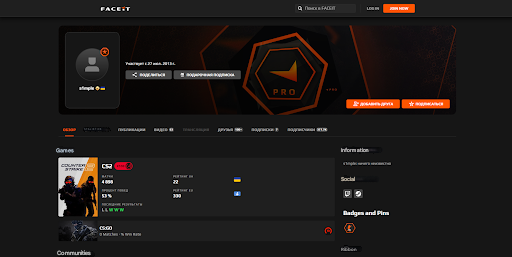
Before starting the connection process, it's worth checking if your account meets platform requirements. FACEIT takes fighting cheaters and smurfs seriously, so they've established strict rules for newcomers.
Since January 30, 2025, you can't even begin the linking process without Prime status in CS2. This isn't a recommendation but a mandatory requirement for all fresh accounts. Prime is purchased in Steam Store once for $14.99 – you'll spend once, but the status remains forever. As a bonus, you get access not only to FACEIT but also to Valve's Premier mode.
Steam profile privacy is another stumbling block. A private profile blocks FACEIT's access to information about games and Prime status. Opening everything is simple: go to Steam settings, privacy section, and switch "My profile" and "Game details" to "Public" mode. Without this, linking CS2 to FACEIT is technically impossible – the system simply won't see the necessary data.
There's a nuance for old FACEIT account owners. Those who registered before January 30, 2025 can play calmly without Prime. But this trick won't work for newcomers.
Sometimes a strange situation occurs: Prime is purchased but the system doesn't see it. It's solved trivially – launch CS2, play one Premier match, and the status updates in Steam database. After this, FACEIT recognizes Prime without problems.
How to Register on FACEIT?
Creating an account on the platform is the starting point before linking CS2 to FACEIT. The procedure is simple and won't take more than five minutes.
FACEIT made life easier for newcomers by offering three registration methods right away. Go to faceit.com, see the registration button in upper right – click it. Then choose a convenient option: classic email registration with filling in nickname, password and email, express login through Steam where the system automatically pulls data from profile, or Facebook authorization for those used to social networks.
Chose email registration? Think carefully about your nickname – this is what opponents will see in matches, and you can only change it once every three months and only with Premium subscription. After filling the form, check your email. The confirmation letter should arrive within 5-10 minutes, sometimes it lands in spam. The link is active for 24 hours – don't delay clicking it, otherwise you'll have to register again.
Next stage is basic profile setup. Here we upload avatar, indicate region of residence, and select interesting games from list. Nothing complicated.
Useful tip from veterans: use the same email during registration that's linked to your Steam account. If problems arise and you need to write to support, matching email will simplify owner identification. After completing all these steps, you can calmly proceed to Steam connection – the most important part of the process.
How to Link Steam to FACEIT CS2?
Understanding how to link Steam to FACEIT CS2 isn't difficult – the main thing is to act consistently and not skip steps. Any mistake at one of the stages will roll the process back, you'll have to start over. FACEIT strictly controls the connection between accounts to prevent fraud and multi-accounting.
Steam Profile Setup
You need to start with Steam account preparation. Open Steam client, click on your nickname in upper right corner and select "View profile". There you'll see "Edit profile" button – click it and enter settings. In horizontal menu look for "Privacy Settings" item.
Here are three key parameters, each with three setting options: "Public", "Friends Only" and "Private". For correct work with FACEIT it's critically important to set "Public" for two positions: "My profile" and "Game details". The third item "Inventory" can be set to whatever you like – it doesn't affect linking at all.
After saving changes there's one proven trick: close Steam completely and restart. This simple step guarantees that settings have definitely been applied. Often restart solves problems with profile recognition on third-party platforms.
Connecting Steam to FACEIT
Log into your FACEIT account on the website, open profile settings through icon in upper right. In left menu find "Integrations" section – here all platforms available for connection are collected. Next to Steam logo you'll see "Connect Steam" button.
Click – the system automatically redirects to Steam authorization page. Enter login and password from Steam account. If you have Steam Guard two-factor authentication enabled (and it should be enabled for security), you'll need to enter code from mobile app or email.
After successful login, Steam will show window with connection confirmation request. There will be a list of permissions that the platform will receive: access to profile information, games list, and played hours. Click "Allow" – done, Steam is linked to FACEIT.
Counter-Strike 2 Activation
Now the interesting part. After successful Steam connection, in the same "Integrations" section, the ability to add Counter-Strike 2 automatically appears. Next to the game logo you'll see "Connect CS2" button. The system launches automatic check: is there Prime status, is profile open, are there any game bans.
Everything in order? A window with game region selection will appear. Don't rush – correct region choice is critically important for ping and connection quality. You can change it later only through settings, which is additional hassle. For players from Russia and CIS, optimal options are "Europe" or "CIS" regions, they give ping within 30-60 ms.
After region selection, the system will show a message about successful CS2 linking to account. Now remains the last mandatory step – installing FACEIT anti-cheat client.
Important Limitations
Remember the iron rule: one Steam account links only to one FACEIT profile. Attempting to connect already-used Steam to another account will produce an error. The system doesn't provide self-unlinking Steam – for this you need to write to support service and prove that the account is really yours.
Common Errors When Trying to Link CS2 to FACEIT
Even when following all instructions, players regularly face technical errors. Understanding the causes of these problems helps quickly eliminate them without contacting support. Most errors are related to non-compliance with platform requirements or technical failures.
The most common problem is the message "We noticed your Steam account doesn't have Prime Status for CS2". This error appears when the system doesn't detect Prime status in account. The solution is simple: purchase Prime in Steam for $14.99 through Counter-Strike 2 page in store. If Prime is already purchased but error persists, launching one match in Premier mode helps – the system will update status information.
Second most frequent error is "This Steam ID is already in use on another FACEIT account". It means this Steam is already linked to another FACEIT profile. The only solution is to contact platform technical support through Help section on site, providing ownership proof: Steam profile screenshots, purchase receipts from Steam and other confirming materials.
Third common problem is related to closed profile. Error "Your profile or game details are set to private" appears when Steam privacy settings block data access. You need to return to privacy settings and make sure both parameters – "My profile" and "Game details" – are set to "Public" position.
Fourth error is "The Steam account you're trying to use is different from your connected account". This happens when player tries to connect Counter-Strike 2 from account different from one already linked to FACEIT in integrations section. Solution – check which Steam exactly is connected in settings and use CS2 from this very account.
Installing FACEIT Anti-Cheat

After successfully linking CS2 to FACEIT, it's too early to relax – ahead is the mandatory anti-cheat client installation stage. Without it, the system won't even let you near matches, even if all other conditions are met. FACEIT Anti-Cheat works at operating system kernel level, providing protection an order of magnitude higher than Valve's built-in VAC.
Download the program only from official website at faceit.com/en/anti-cheat. No third-party sources! Downloaded file from shady site – got a virus or account ban as a gift. After downloading installation file, run it necessarily as administrator, otherwise installation may go wrong.
During installation, the system will ask for authorization – enter same login and password used during FACEIT registration. The program automatically integrates into system. Final stage – computer restart. Don't ignore this step, anti-cheat will work correctly only after system reboot.
Anti-Cheat System Requirements
FACEIT Anti-Cheat is picky about OS. Works exclusively on Windows 10 and Windows 11 with 64-bit architecture. Sitting on Windows 7 or even older version? Sorry, anti-cheat won't install. There's complete absence of Linux and macOS support – Apple computer owners will have to fiddle with Windows virtual machine or use separate PC.
Critically important thing is Secure Boot in motherboard BIOS. Without enabled secure boot function, anti-cheat will refuse to launch and produce error. Activating is simple: restart computer, during startup press Delete or F2 (depends on motherboard manufacturer), find Security or Boot section and enable Secure Boot option.
Also requires TPM 2.0 (Trusted Platform Module). On Intel processors it's called PTT, on AMD – fTPM. This component is responsible for hardware encryption and system protection. Activated in same place, in BIOS, in same section as Secure Boot.
Possible Conflicts
After installation and reboot, you need to launch FACEIT Anti-Cheat before each gaming session. The program sits in system tray with orange icon – if you don't see it, means anti-cheat isn't running.
Sometimes conflicts arise with peripheral drivers – gaming mice, keyboards, headphones. Manufacturers like Razer, Logitech or SteelSeries use their own kernel-level drivers that may conflict with anti-cheat. This manifests differently: anti-cheat won't start, game crashes, or peripherals stop working.
Solved by adding launch parameter to Counter-Strike 2. Open Steam, find CS2 in library, right-click, select "Properties". In "Launch Options" field enter command -allow_third_party_software. This command permits third-party software operation parallel with anti-cheat, and conflict usually disappears.
First Steps After Linking
After completing all setup stages, you can finally start playing on FACEIT. However, before first match it's worth spending a few minutes on final client check and setup. This will help avoid technical problems directly in game.
After launching FACEIT Anti-Cheat, you need to wait until program icon in system tray becomes green – this means all components are working correctly. Then you can go to FACEIT website or open desktop platform client for match search.
In "Play" section, various modes are available: free queue, Premium matches for subscribers, tournaments and leagues. Newcomers are recommended to start with free queue to understand platform mechanics. First 3-5 matches will be calibration – system will determine player's initial ELO level based on these games' results.
Important moment: at first connection to FACEIT server, system automatically applies Counter-Strike 2 launch parameters. No need to manually write connect commands – just press "Play" button on site, and game will launch automatically with correct settings.
Can You Get By Without Prime Status?
This is one of the most frequent questions from new players planning to link CS2 to FACEIT. The situation with Prime status changed in 2024 when platform introduced mandatory requirement for having it. Before this moment, playing on FACEIT was possible with any Steam account having Counter-Strike in library.
According to official information from FACEIT support service, all new Counter-Strike 2 game registrations require confirmed Prime status. This requirement applies to all regions without exceptions. Old accounts linked before this rule introduction retain ability to play, but when attempting to reconnect game, system will also require Prime.
Alternative ways to bypass this requirement don't exist. Various forums and communities sometimes offer "life hacks" like temporary Prime account rental, but all these methods violate platform rules and will lead to permanent block. The only legal path is purchasing Prime for $14.99 in official Steam store.
It's worth noting that Prime status in Counter-Strike 2 is a one-time purchase, valid indefinitely. After activation, repeat payment or subscription renewal won't be required. This investment pays off with improved match quality both on FACEIT and in Valve's official matchmaking.
From Linking to First FACEIT Matches
The process of how to link CS2 to FACEIT requires consistent execution of several mandatory steps. Key condition is having Prime status costing $14.99 and setting up public profile in Steam. Without these components, system won't allow completing game registration on platform.
FACEIT Anti-Cheat installation is a mandatory procedure that cannot be skipped. The program provides significantly higher level of protection against cheaters compared to built-in VAC system. When technical problems or errors arise in the process of linking CS2 to FACEIT, it's recommended to contact FACEIT official support service, providing detailed situation description and error screenshots.